Safety and compliance
The Safety compliance centre
What each of the five Safety tabs answers, which ones you see, and which parts of safety live outside this page.
Safety is one page with five tabs, each answering a single question. The heading carries a PDRA-01 label, because every readiness check on this page is written against that authorisation. Not everything called safety lives here — occurrence reports and the review queue are elsewhere, and this page tells you where.
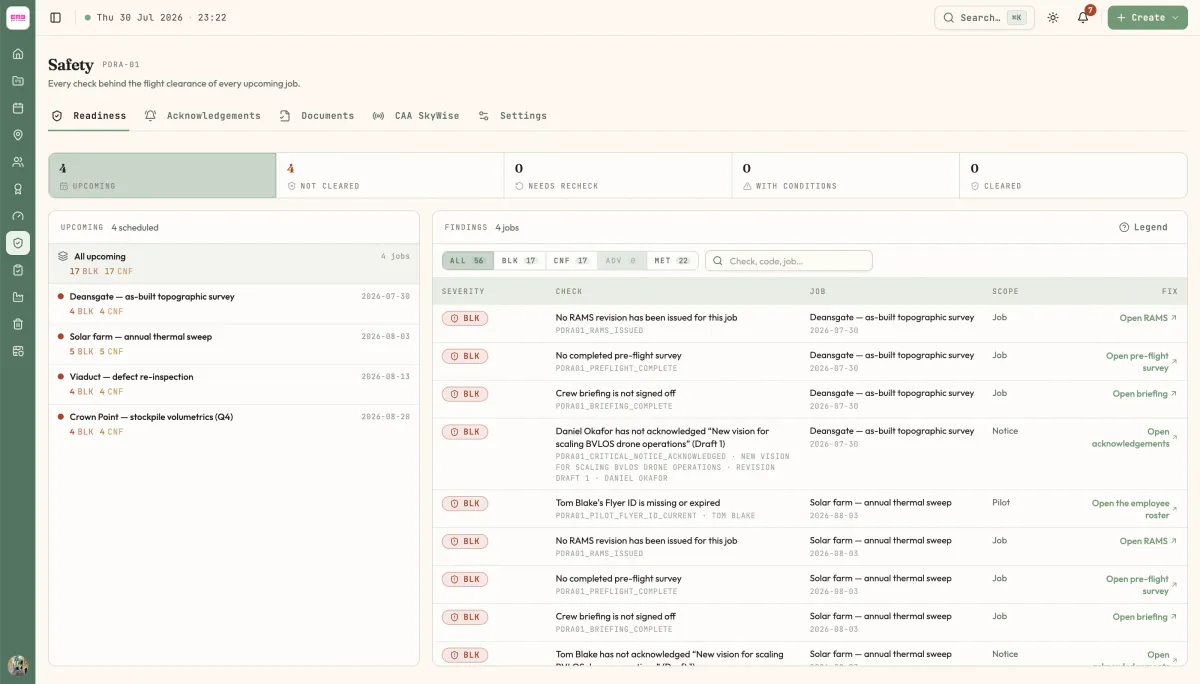
The five tabs
Each tab writes its own one-line subtitle under the Safety heading. That line is the question the tab answers.
| Tab | Subtitle | Use it to |
|---|---|---|
| Readiness | Every check behind the flight clearance of every upcoming job. | Answer "can we fly?" for a job, or find every blocker across the week |
| Acknowledgements | The notices you owe an acknowledgement, and the ones you have signed. | Clear what you personally owe, and re-read what you have already signed |
| Documents | The controlled register — what this organisation has published, and where each revision stands. | Draft, review, publish and supersede controlled documents |
| CAA SkyWise | What the CAA has published, and what this organisation did with it. | Read the regulator feed and promote an alert into a company bulletin |
| Settings | Who approves what, and when a clearance is blocked rather than flagged. | Set the operating mode, the release gate and the evidence currency window |
Which tabs you see
Readiness, Acknowledgements and CAA SkyWise are open to every member of the organisation. Two are gated:
- Documents needs either the Manage safety permission or the Review safety documents permission.
- Settings needs the Manage safety permission.
If you follow a link to a tab you cannot see, the page opens Readiness instead. It does not show an error — the tab is simply not there. If you expected a tab and it is missing, ask an organisation admin to check your role.
What PDRA-01 means here
PDRA-01 is the UK pre-defined risk assessment this product models. It is not a setting you choose: every job is evaluated against the same 18 checks, and the label beside the Safety heading names the profile those checks come from. The evaluator has a version — the Settings tab shows it as EVALUATOR pdra01.v4. A clearance recorded under an older evaluator keeps the wording and the judgement it was recorded with; nothing rewrites a past decision.
See Readiness checks for the full list of checks, what each severity does to a flight, and where to go to clear each finding.
Where safety lives outside this page
Three things people look for on Safety are deliberately somewhere else.
Occurrence and airprox reports are a job document. Open the job, go to the Forms tab, and find the Safety group in the left rail. There is no way to start an occurrence report from the Safety page. See Occurrence and airprox reports.
The review queue is at /reviews. Controlled-document revisions and submitted job forms share one inbox, under Reviews in the sidebar. It is not duplicated onto Safety. See The review inbox.
Recording a clearance happens on the job. The Readiness tab has a Record clearance button once you select a job, but the usual route is the Flight release readout in the job header, which opens the same dialog. See Record a flight clearance.
Notices you owe also surface on the Home page, in the Safety panel, with the same Accept button as the Acknowledgements tab.
Last reviewed 28 July 2026 · verified against 18e3cb4