Start here
The home workbench
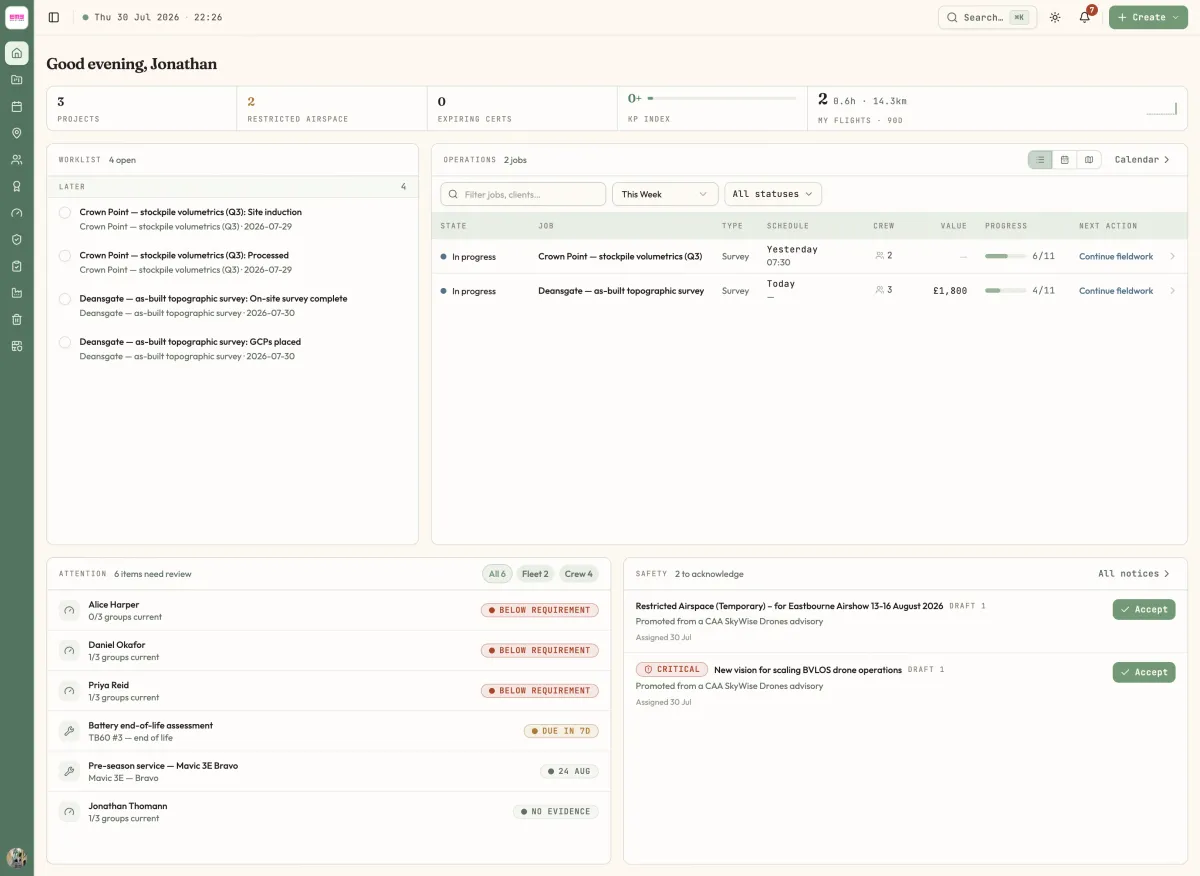
Home is an operations workbench in five zones — a readout strip, your worklist, the Operations jobs hero, and the Attention and Safety annunciators.
Home (/) is not a summary page you skim on the way somewhere else. It is an instrument panel: five zones, each answering one question, and everything on it is clickable through to the thing it is talking about. It opens with a greeting — Good morning, Sam — and then gets straight to work.
The readout strip
The band across the top. Projects counts your active projects and opens /projects. Restricted Airspace turns amber when any project intersects restricted airspace. Expiring Certs turns amber when certificates are approaching expiry and opens /organization/certificates. Kp Index is a four-band gauge of the measured geomagnetic index — above 5, expect degraded GNSS/RTK accuracy. The wide block on the right is My Flights · 90d: your flight count, hours and kilometres over the last 90 days, with a weekly sparkline.
Worklist
Your personal queue, on the left. The header meta reads 3 overdue · 11 open. To review sits at the top and holds documents waiting on your sign-off; below it, every open todo you own is bucketed into Overdue, Today, This Week and Later. Tick the checkbox to clear a task. Each row links to the job or the piece of equipment it belongs to. When there is nothing left it says You’re all clear.
Operations
The jobs hero, and the biggest thing on the page. Three views behind the segmented control: List, Week and Map. The toolbar filters by text, by timeframe and by status; the filters are applied on the server, so the counts are honest rather than a filtered slice of one page.
The List columns are State, Job, Type, Schedule, Crew, Value, Progress and Next action. Value only appears if you have the Manage finance permission. Next action is the panel’s opinion about what the job needs now — Plan mission, Continue fieldwork, Resolve hold, Review & deliver. Week is a read-only Mon–Sun grid. Map plots this week’s jobs by project location.
Attention and Safety
Two annunciators along the bottom. Attention is one ranked feed of everything at risk across the organisation, worst first, filtered by the Fleet and Crew chips: fleet maintenance falling due, and pilots whose recency is lapsing or whose records need classifying. Rows jump straight to the equipment or the logbook. Managers see the whole roster here; everyone else sees their own recency.
Safety lists the company notices assigned to you that you have not yet acknowledged, marked Critical where they are. Accept records that you have read and understood the revision.
If Home looks empty, it is because your organisation has nothing in it yet — work through Set up your first workspace and every zone fills in.
Last reviewed 28 July 2026 · verified against 18e3cb4